Sign in
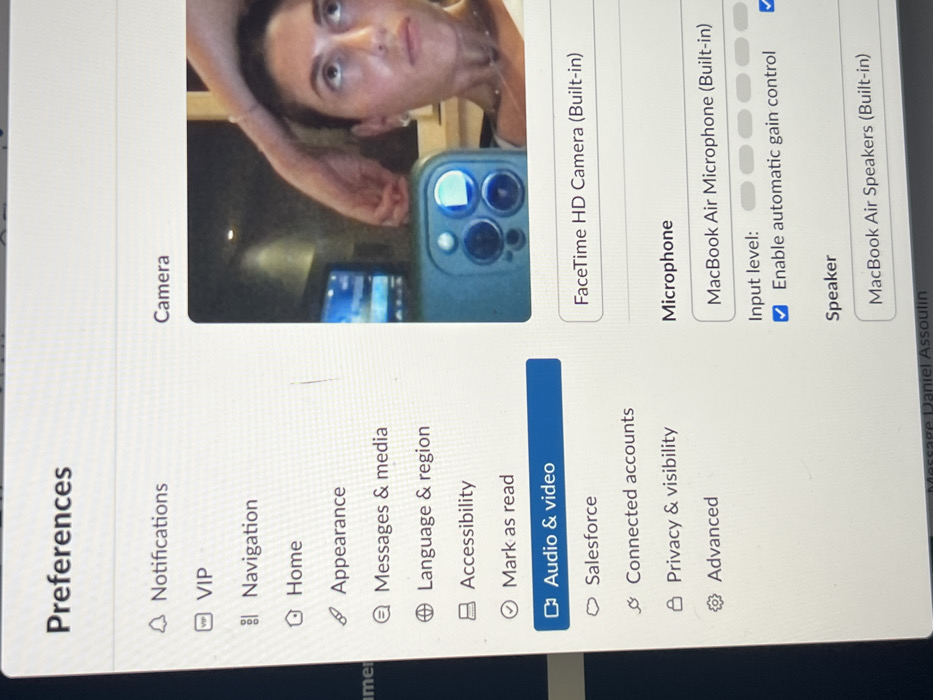
A screenshot of a macOS preferences window titled "Preferences". On the left, a list of options includes Notifications, VIP, Navigation, Home, Appearance, Messages & media, Language & region, Accessibility, Mark as read, Audio & video (selected), Salesforce, Connected accounts, Privacy & visibility, and Advanced. On the right, the "Camera" tab displays "FaceTime HD Camera (Built-in)". Below the "Microphone" heading, "MacBook Air Microphone (Built-in)" is selected, with the "Enable automatic gain control" checkbox checked. The selected speaker is "MacBook Air Speakers (Built-in)". A video feed is showing a person.
lit

Jun 23, 2025, 5:39 PM

Raanana, Israel

Stake attention in this memory

Preferences
Audio & video settings
MacBook
FaceTime HD Camera
Microphone settings

A screenshot of a macOS preferences window titled "Preferences". On the left, a list of options includes Notifications, VIP, Navigation, Home, Appearance, Messages & media, Language & region, Accessibility, Mark as read, Audio & video (selected), Salesforce, Connected accounts, Privacy & visibility, and Advanced. On the right, the "Camera" tab displays "FaceTime HD Camera (Built-in)". Below the "Microphone" heading, "MacBook Air Microphone (Built-in)" is selected, with the "Enable automatic gain control" checkbox checked. The selected speaker is "MacBook Air Speakers (Built-in)". A video feed is showing a person.

Loading AttnAds…

transactions
revenues
stakers
Earliest
Latest
Highest stake

No transactions found

More from this user

More from Raanana

lit

Jun 23, 2025, 5:39 PM

Raanana, Israel

Licensed under Creative Commons Attribution 4.0 International License. You are free to share and adapt this content with proper attribution.