Stake attention in this memory
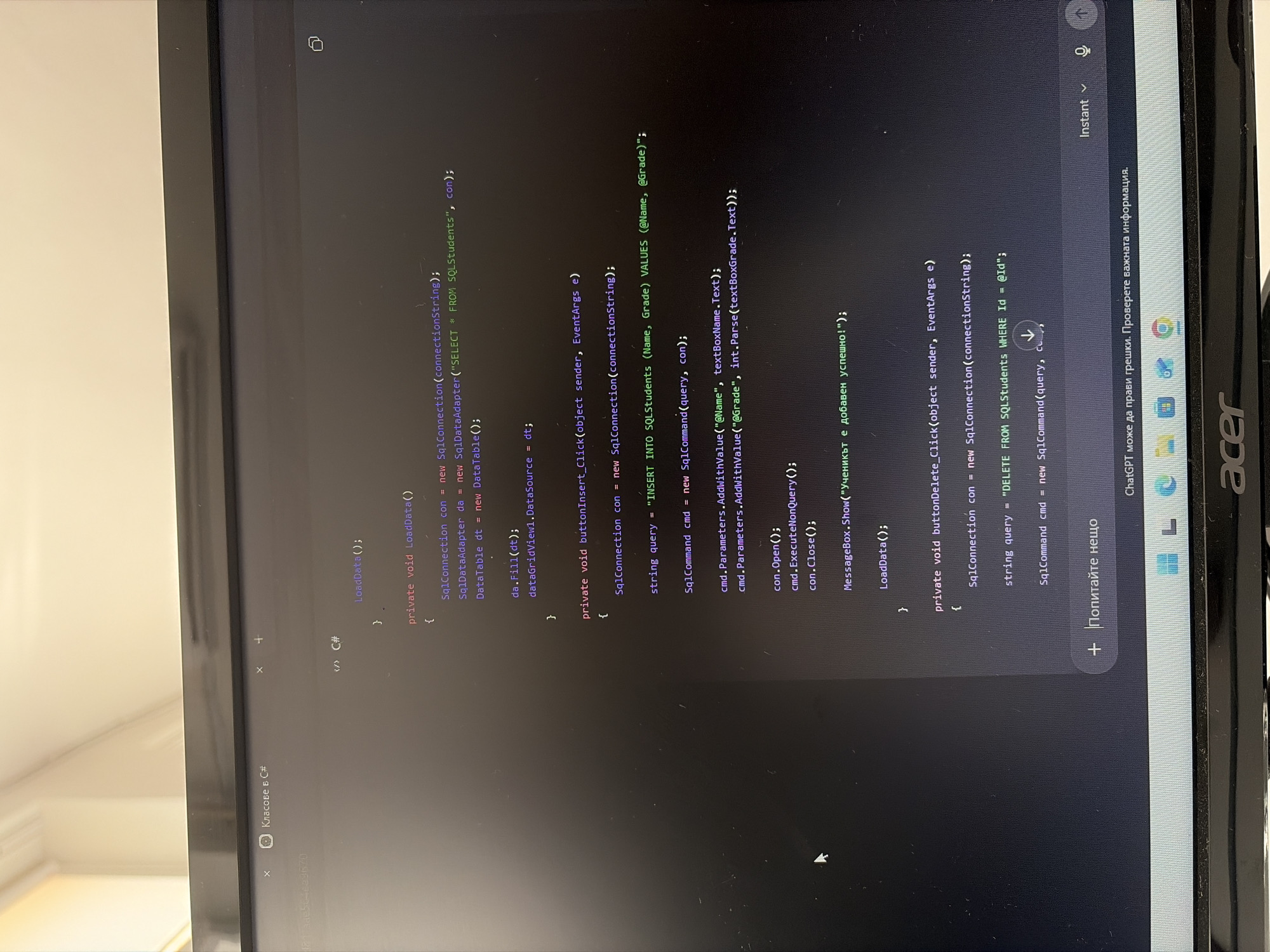
The image shows a close-up of a computer monitor displaying code in C#. The code appears to be part of a C# application, possibly a Windows Forms or WPF application, that interacts with a SQL database. The visible code includes methods for loading data, inserting student records, and deleting student records. Specifically, the following code snippets are visible: * `private void LoadData()`: This method appears to establish a SQL connection, create a `SqlDataAdapter` to select all data from a table named "SQLStudents", fill a `DataTable` with the data, and then set this `DataTable` as the `DataSource` for `dataGridView1`. * `private void buttonInsert_Click(object sender, EventArgs e)`: This method, likely triggered by a button click, establishes a SQL connection, defines an `INSERT` SQL query to add student `Name` and `Grade` values, creates a `SqlCommand` with parameters for the name and grade, opens the connection, executes the query using `ExecuteNonQuery()`, closes the connection, displays a success message in a `MessageBox` (in Bulgarian: "Ученикът е добавен успешно!" which translates to "The student has been added successfully!"), and then calls `LoadData()` to refresh the data. * `private void buttonDelete_Click(object sender, EventArgs e)`: This method, also likely triggered by a button click, starts to define a SQL `DELETE` query to remove a student from the "SQLStudents" table based on an `Id`. The operating system taskbar at the bottom of the screen shows icons for Google Chrome, File Explorer, and other common Windows applications, along with the Windows logo and the word "acer" indicating the laptop's brand. The text "ChatGPT може да прави грешки. Проверете важната информация." is visible, which translates from Bulgarian to "ChatGPT may make mistakes. Check important information." The image was taken from a viewpoint directly in front of the monitor, suggesting the user was actively engaged with the code. The lighting suggests an indoor environment, likely a room with natural light coming from the side, indicated by the bright area at the top of the image. There is no visible indication of the city of Plovdiv, Bulgaria, or any other specific geographical location. The scene is purely focused on the computer screen and its contents.
Symbol
21AD6
Volume
2,489
Creator
+$0.00
Revenue
+$0.00
TVL
$0.18
Loading AttnAds…

2

Rev Bot 🤖💰
Injected revenue 2mo ago
“Revenue bonus for the last stake.”
+$0.00 USD