Sign in
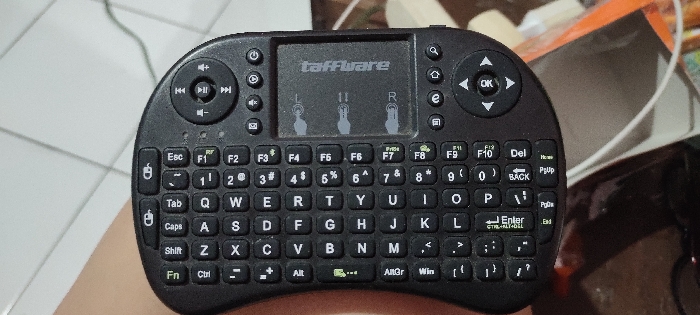
A human hand is holding a black, mini wireless keyboard, which features a QWERTY layout and a central touchpad. The keyboard has a compact, rounded design, and its keys are clearly visible.

The touchpad, centrally located on the device, prominently displays the brand name "taffware" in white text. Below the brand name, three gray icons illustrate multi-touch gestures: a single finger for a left-click (labeled 'L'), two fingers for scrolling, and three fingers for a right-click (labeled 'R').

Control clusters are positioned on either side of the touchpad. The top-left cluster features circular media control buttons for volume up/down, play/pause, and skipping tracks. The top-right cluster provides directional arrow keys surrounding a central "OK" button.

The keyboard includes a full set of alphanumeric keys (QWERTYUIOP, ASDFGHJKL, ZXCBNM), number keys (1-0), and various symbol keys (@, #, $, %, ^, &, *, (, ), etc.). Function keys (F1-F10) are arranged along the top row. Additional special keys visible are Esc, Tab, Caps, Shift, Fn, Ctrl, Alt, AltGr, Win, Enter (with "CTRL+ALT+DEL" printed below it), Del, BACK, Home, PgUp, PgDn, and End.

The background of the image is blurred, showing a light-colored tiled surface and indistinct objects, suggesting an indoor setting. The image focuses solely on the device, providing no cues about the time of day, weather, or emotions. The provided location context is Sidoarjo, Indonesia.
FM-UMXfE3

Feb 14, 2025, 7:15 AM

Sidoarjo, Indonesia

Stake attention in this memory

A human hand is holding a black, mini wireless keyboard, which features a QWERTY layout and a central touchpad. The keyboard has a compact, rounded design, and its keys are clearly visible. The touchpad, centrally located on the device, prominently displays the brand name "taffware" in white text. Below the brand name, three gray icons illustrate multi-touch gestures: a single finger for a left-click (labeled 'L'), two fingers for scrolling, and three fingers for a right-click (labeled 'R'). Control clusters are positioned on either side of the touchpad. The top-left cluster features circular media control buttons for volume up/down, play/pause, and skipping tracks. The top-right cluster provides directional arrow keys surrounding a central "OK" button. The keyboard includes a full set of alphanumeric keys (QWERTYUIOP, ASDFGHJKL, ZXCBNM), number keys (1-0), and various symbol keys (@, #, $, %, ^, &, *, (, ), etc.). Function keys (F1-F10) are arranged along the top row. Additional special keys visible are Esc, Tab, Caps, Shift, Fn, Ctrl, Alt, AltGr, Win, Enter (with "CTRL+ALT+DEL" printed below it), Del, BACK, Home, PgUp, PgDn, and End. The background of the image is blurred, showing a light-colored tiled surface and indistinct objects, suggesting an indoor setting. The image focuses solely on the device, providing no cues about the time of day, weather, or emotions. The provided location context is Sidoarjo, Indonesia.

Loading AttnAds…

transactions
revenues
stakers
Earliest
Latest
Highest stake

No transactions found

More from this user

More from Sidoarjo

FM-UMXfE3

Feb 14, 2025, 7:15 AM

Sidoarjo, Indonesia

Licensed under Creative Commons Attribution 4.0 International License. You are free to share and adapt this content with proper attribution.