Sign in
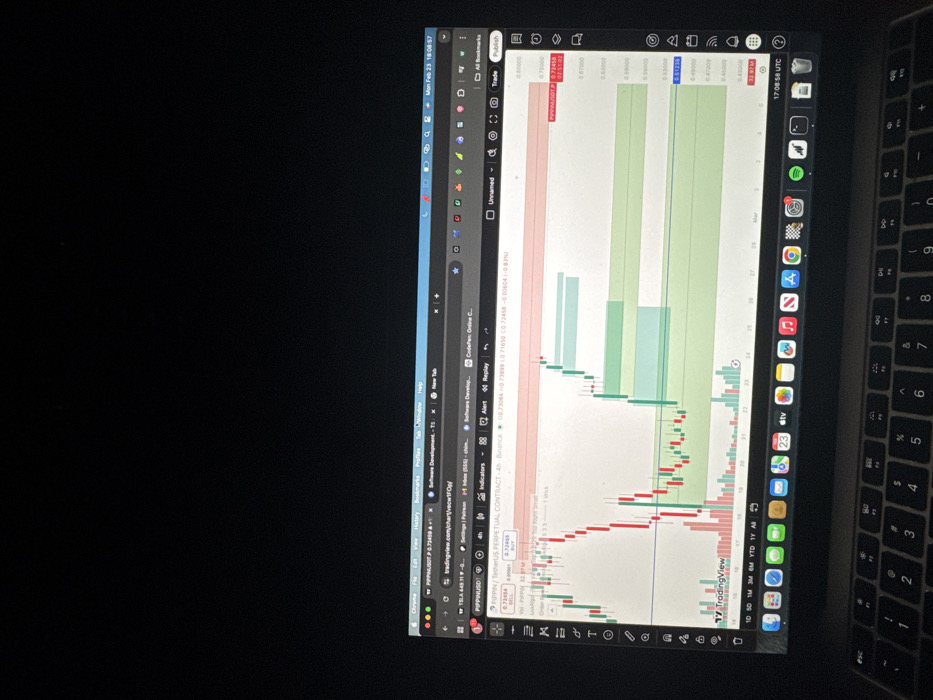
The image displays a laptop, likely a MacBook, placed on a dark surface, with its screen showing a financial trading chart. The laptop is oriented such that the screen and keyboard appear rotated 90 degrees clockwise from a standard viewing position.

The laptop screen is open to Google Chrome, with the primary content being a TradingView chart. The macOS menubar is visible at the top, showing the time as "Mon Feb 23 18:08:57". Several browser tabs are open, including "tradingview.com/chart/vecwOp" and others like "Software Development - TS...", "CodePen: Online C...", and "Patreon".

The TradingView chart specifically displays the "PEPEINUSDT PERPETUAL CONTRACT - 4H - Binance," indicating a 4-hour candlestick chart for the PEPE token against TetherUS on the Binance exchange. The chart features red and green candlesticks, signifying price movements, along with shaded light blue/green and light red rectangular areas, which could represent support/resistance levels, demand/supply zones, or trade targets. A horizontal line is visible at a price of 0.72458, labeled "TP" (Take Profit). The right side of the chart shows a vertical price scale ranging from approximately 0.34000 to 0.77600. The bottom of the chart shows a time scale with dates, including "Feb 23" and "Mar". A time of "17:08:58 UTC" is visible in the top right of the chart area. In the bottom left of the chart area, current bid and ask prices are shown: "SELL 0.72454" and "BUY 0.72465" for "PEPEINUSDT". Various TradingView interface elements like "Indicators," "Alert," "Replay," "Trade," and "Publish" buttons are present.

To the right of the screen, a portion of the laptop's keyboard is visible. It is a standard QWERTY layout, with keys such as "esc", "1", "2", "3", "Q", "W", "A", "S", "Z", "X", and others clearly identifiable.

The macOS dock (taskbar) is visible along the right edge of the screen (due to the rotation), displaying icons for various applications including Finder, Safari, Messages, Mail, Calendar, Contacts, Photos, TV, Music, Spotify, WhatsApp, VS Code, and Google Chrome (currently active).

The overall impression is that someone is actively monitoring or analyzing cryptocurrency markets using technical analysis tools on their laptop. The presence of a "TP" (Take Profit) line suggests that a trade is either active or being planned. The system time "Mon Feb 23 18:08:57" and the chart time "17:08:58 UTC" indicate the specific moment of capture.
Mapw/Wiz

Feb 23, 2026, 5:09 PM

Ihiagwa, Nigeria

Stake attention in this memory

laptop
trading chart
cryptocurrency
screen
financial analysis

The image displays a laptop, likely a MacBook, placed on a dark surface, with its screen showing a financial trading chart. The laptop is oriented such that the screen and keyboard appear rotated 90 degrees clockwise from a standard viewing position. The laptop screen is open to Google Chrome, with the primary content being a TradingView chart. The macOS menubar is visible at the top, showing the time as "Mon Feb 23 18:08:57". Several browser tabs are open, including "tradingview.com/chart/vecwOp" and others like "Software Development - TS...", "CodePen: Online C...", and "Patreon". The TradingView chart specifically displays the "PEPEINUSDT PERPETUAL CONTRACT - 4H - Binance," indicating a 4-hour candlestick chart for the PEPE token against TetherUS on the Binance exchange. The chart features red and green candlesticks, signifying price movements, along with shaded light blue/green and light red rectangular areas, which could represent support/resistance levels, demand/supply zones, or trade targets. A horizontal line is visible at a price of 0.72458, labeled "TP" (Take Profit). The right side of the chart shows a vertical price scale ranging from approximately 0.34000 to 0.77600. The bottom of the chart shows a time scale with dates, including "Feb 23" and "Mar". A time of "17:08:58 UTC" is visible in the top right of the chart area. In the bottom left of the chart area, current bid and ask prices are shown: "SELL 0.72454" and "BUY 0.72465" for "PEPEINUSDT". Various TradingView interface elements like "Indicators," "Alert," "Replay," "Trade," and "Publish" buttons are present. To the right of the screen, a portion of the laptop's keyboard is visible. It is a standard QWERTY layout, with keys such as "esc", "1", "2", "3", "Q", "W", "A", "S", "Z", "X", and others clearly identifiable. The macOS dock (taskbar) is visible along the right edge of the screen (due to the rotation), displaying icons for various applications including Finder, Safari, Messages, Mail, Calendar, Contacts, Photos, TV, Music, Spotify, WhatsApp, VS Code, and Google Chrome (currently active). The overall impression is that someone is actively monitoring or analyzing cryptocurrency markets using technical analysis tools on their laptop. The presence of a "TP" (Take Profit) line suggests that a trade is either active or being planned. The system time "Mon Feb 23 18:08:57" and the chart time "17:08:58 UTC" indicate the specific moment of capture.

Loading AttnAds…

transactions
revenues
stakers
Earliest
Latest
Highest stake

No transactions found

More from this user

More from Ihiagwa

Mapw/Wiz

Feb 23, 2026, 5:09 PM

Ihiagwa, Nigeria

Licensed under Creative Commons Attribution 4.0 International License. You are free to share and adapt this content with proper attribution.