
Stake attention in this memory
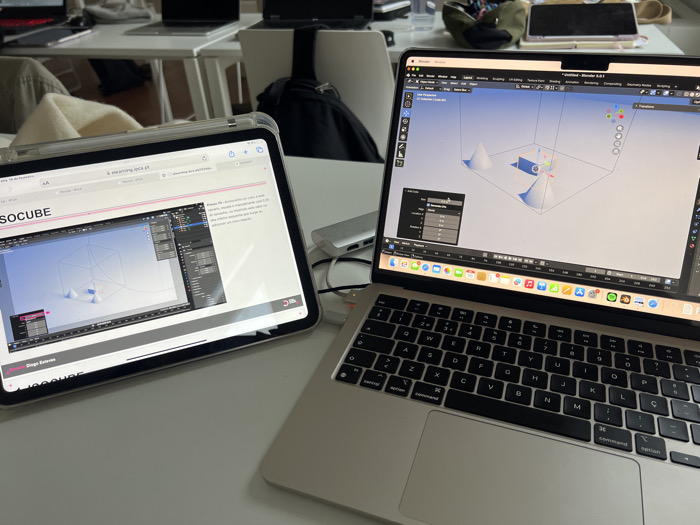
The image depicts a close-up view of a study or work setup, featuring a laptop and a tablet resting on a white desk. In the background, other desks with laptops and chairs are visible, suggesting an office, classroom, or collaborative workspace environment. The main subjects are a silver Apple MacBook laptop on the right and an Apple iPad tablet on the left, connected via a cable to a multi-port adapter partially visible between the devices. The laptop's screen is displaying Blender, a 3D computer graphics software, specifically version 3.0.1, as indicated in the application title bar. The Blender interface shows a 3D scene containing several light-colored cone shapes and a flat plane within a grid-like environment. Various menus and toolbars are visible, including "File," "Edit," "Render," "Window," "Help," and options for "Modeling," "Sculpting," "Layout," etc. A panel on the left side of the Blender window shows parameters like "Radius," "Depth," and "Vertices," along with "Location X, Y, Z," "Rotation X, Y, Z," and "Scale X, Y, Z." The tablet, encased in a clear protective cover, is displaying a web page in a browser, likely Safari. The URL "elearning.ipca.pt" is visible in the address bar, indicating an e-learning platform, possibly from the Instituto Politécnico do Cávado e do Ave (IPCA). The web page content appears to be a tutorial or course material related to 3D modeling, specifically featuring a section titled "ISOCUBE." An embedded image on the web page mirrors the kind of 3D modeling work being done on the laptop, showing a 3D scene with a cube and cones. Partially legible Portuguese text on the page describes a step in the process: "Passo 10 - Adicionamos um cubo e outro cilindro, escala-o horizontalmente com 0.25 do tamanho, de modo que este seja oco. Para isso precisamos que surge ao adicionar um novo objeto." ("Step 10 - We add a cube and another cylinder, scale it horizontally with 0.25 of the size, so that it is hollow. For this we need it to appear when adding a new object.") At the very bottom of the page, the name "Diogo Esteves" is visible. The laptop's keyboard is a QWERTY layout, featuring Portuguese characters such as 'Ç'. The overall scene suggests a learning or work session focused on 3D design and potentially following an online tutorial or course.
No transactions found