Sign in
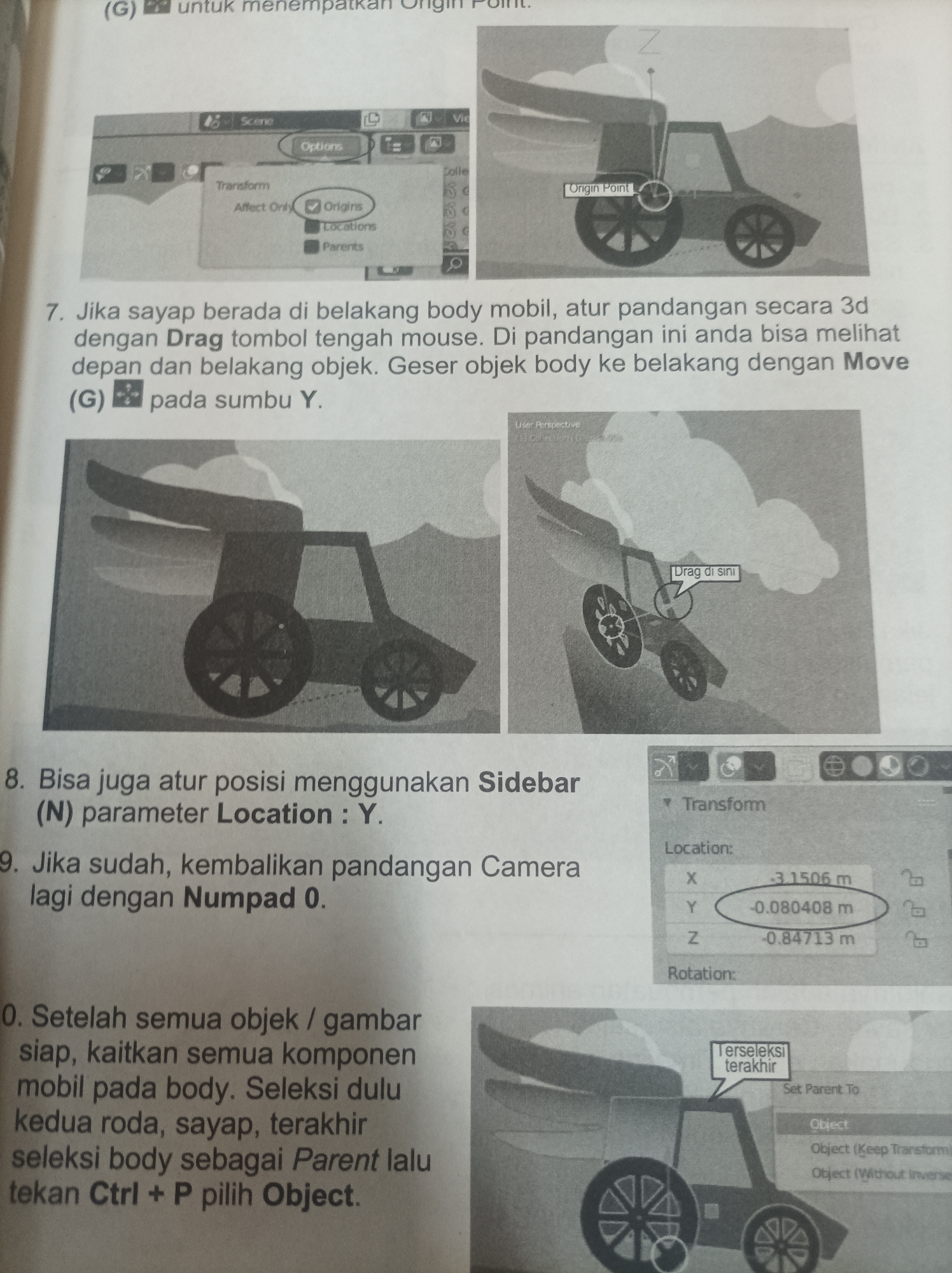
The image shows a page from a manual or tutorial for 3D modeling software. It contains screenshots and text instructions in Indonesian.

The top left screenshot displays a user interface with options for transforming objects, including "Affect Only Origins." The top right screenshot shows a 3D model of a car with an "Origin Point" highlighted.

The main text block describes how to move the car body using the mouse and keyboard. It mentions using the "Drag" function and the "Move" command, and adjusting the Y-axis.

The middle left screenshot shows the car model from a different angle. The middle right screenshot shows the car model with a "Drag di sini" (Drag here) annotation, pointing to the rear of the car.

Further text instructions discuss using the "Sidebar" and setting the "Location: Y" parameter. Another instruction refers to returning the view with "Numpad 0."

The bottom left screenshot shows the car model from a side view. The bottom right screenshot shows a "Transform" panel in the software interface, with numerical values for X, Y, and Z coordinates. The Y coordinate is circled. There are also options for "Rotation" and a "Terselski Terakhir" (Last Selected) box with options to "Set Parent To" an "Object" or "Object (Keep Transform)" or "Object (Without Inverse)."

The overall context is a step-by-step guide on how to manipulate and parent objects within a 3D modeling environment. There are no people or indications of a specific city or outdoor environment.
Dudul

Jun 18, 2026

Unknown, Unknown

Moment

Stake attention in this memory

instructional
technical
visual-aid
step-by-step
focused

The image shows a page from a manual or tutorial for 3D modeling software. It contains screenshots and text instructions in Indonesian. The top left screenshot displays a user interface with options for transforming objects, including "Affect Only Origins." The top right screenshot shows a 3D model of a car with an "Origin Point" highlighted. The main text block describes how to move the car body using the mouse and keyboard. It mentions using the "Drag" function and the "Move" command, and adjusting the Y-axis. The middle left screenshot shows the car model from a different angle. The middle right screenshot shows the car model with a "Drag di sini" (Drag here) annotation, pointing to the rear of the car. Further text instructions discuss using the "Sidebar" and setting the "Location: Y" parameter. Another instruction refers to returning the view with "Numpad 0." The bottom left screenshot shows the car model from a side view. The bottom right screenshot shows a "Transform" panel in the software interface, with numerical values for X, Y, and Z coordinates. The Y coordinate is circled. There are also options for "Rotation" and a "Terselski Terakhir" (Last Selected) box with options to "Set Parent To" an "Object" or "Object (Keep Transform)" or "Object (Without Inverse)." The overall context is a step-by-step guide on how to manipulate and parent objects within a 3D modeling environment. There are no people or indications of a specific city or outdoor environment.

Symbol

6B977

Volume

3,387

Creator

+$0.03

Revenue

+$0.05

TVL

$2.44

1D
1W
1M
All
transactions
revenues
stakers
Earliest
Latest
Highest stake

1

Henry CM

Staked 3d ago

$2.41 USD

+$0.03 USD

+1%

2

Rev Bot 🤖💰

Injected revenue 3d ago

Revenue bonus for the last stake.

+$0.06 USD

More from this user

More from Unknown

Dudul

Jun 18, 2026

Unknown, Unknown

Licensed under Creative Commons Attribution 4.0 International License. You are free to share and adapt this content with proper attribution.