
Sign in
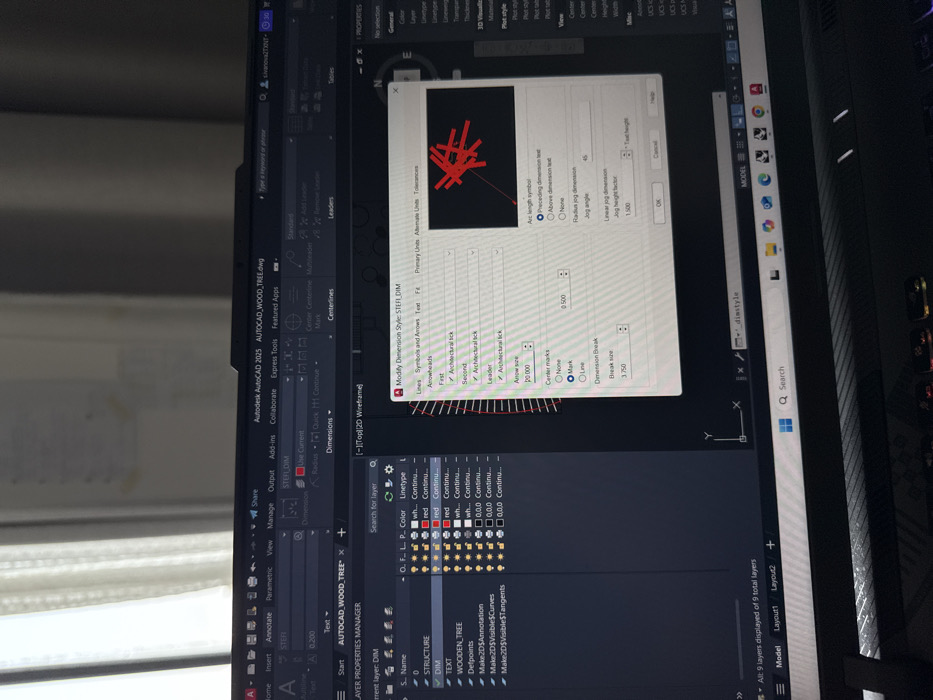
An AutoCAD interface displays the "Layer Properties Manager" on the left, listing layers like "STRUCTURE," "DIM," and "TEXT." The main workspace shows a 2D wireframe model of a tree. A "Modify Dimension Style" dialog box is open, focused on the "Symbols and Arrows" tab. Settings such as "Architectural tick" for arrowheads, arrow size of "0.500," and "Jog angle" of "45" are visible. The "Dimension Break" is set to "3.750."
Stef

Jun 14, 2025, 12:27 PM

Milan, Italy

Stake attention in this memory

CAD software
dimension style
user interface
properties manager
AutoCAD
technical drawing

An AutoCAD interface displays the "Layer Properties Manager" on the left, listing layers like "STRUCTURE," "DIM," and "TEXT." The main workspace shows a 2D wireframe model of a tree. A "Modify Dimension Style" dialog box is open, focused on the "Symbols and Arrows" tab. Settings such as "Architectural tick" for arrowheads, arrow size of "0.500," and "Jog angle" of "45" are visible. The "Dimension Break" is set to "3.750."

transactions
revenues
stakers
Earliest
Latest
Highest stake

No transactions found

More from this user

More from Milan

Stef

Jun 14, 2025, 12:27 PM

Milan, Italy

Licensed under Creative Commons Attribution 4.0 International License. You are free to share and adapt this content with proper attribution.