
Sign in
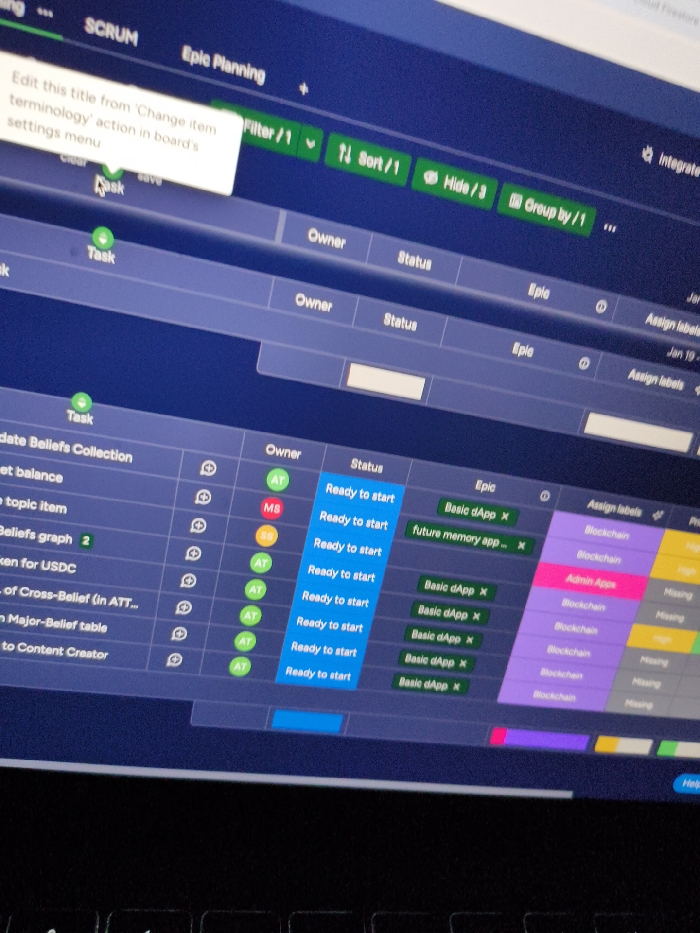
The image captures a digital screen, likely a laptop or computer monitor, displaying a project management interface. The screen is seen at an angle, illuminated against a dark background, suggesting a low-light environment. A keyboard is partially visible at the bottom.

The software displayed is titled "SCRUM Epic Planning" at the top. A pop-up message in the upper left corner instructs, "Edit this title from 'Change item terminology' action in board's settings menu," with options like "clear" and "save," indicating configuration or customization. Below this, "Task" is prominently displayed as a section title.

The main content of the screen is a table-like view, presumably a Kanban or Scrum board. It features columns for "Owner," "Status," "Epic," and "Assign labels." Several task items are listed, such as "Update Beliefs Collection," "get balance," "topic item," "Beliefs graph 2," "ken for USDC," "of Cross-Belief (in ATT...)," "Major-Belief table," and "to Content Creator." Owners are identified by initials like "AT," "MS," and "SB." All visible tasks have the "Ready to start" status. Epics associated with these tasks include "Basic dApp X" and "future memory app...". Labels like "Blockchain," "Admin Apps," and "Missing" are also assigned to tasks.

Other interface elements visible include "Filter/1," "Sort/1," "Hide/3," and "Group by/1" controls at the top, along with "Firestore" and "Integrate" faintly visible in the upper right. A "Help" button is present at the bottom right. The screen exhibits a dark blue theme with green and various colored accents for labels and status indicators.
FM-H8msh3

Jan 30, 2025

Milano, Italy

Stake attention in this memory

The image captures a digital screen, likely a laptop or computer monitor, displaying a project management interface. The screen is seen at an angle, illuminated against a dark background, suggesting a low-light environment. A keyboard is partially visible at the bottom. The software displayed is titled "SCRUM Epic Planning" at the top. A pop-up message in the upper left corner instructs, "Edit this title from 'Change item terminology' action in board's settings menu," with options like "clear" and "save," indicating configuration or customization. Below this, "Task" is prominently displayed as a section title. The main content of the screen is a table-like view, presumably a Kanban or Scrum board. It features columns for "Owner," "Status," "Epic," and "Assign labels." Several task items are listed, such as "Update Beliefs Collection," "get balance," "topic item," "Beliefs graph 2," "ken for USDC," "of Cross-Belief (in ATT...)," "Major-Belief table," and "to Content Creator." Owners are identified by initials like "AT," "MS," and "SB." All visible tasks have the "Ready to start" status. Epics associated with these tasks include "Basic dApp X" and "future memory app...". Labels like "Blockchain," "Admin Apps," and "Missing" are also assigned to tasks. Other interface elements visible include "Filter/1," "Sort/1," "Hide/3," and "Group by/1" controls at the top, along with "Firestore" and "Integrate" faintly visible in the upper right. A "Help" button is present at the bottom right. The screen exhibits a dark blue theme with green and various colored accents for labels and status indicators.

transactions
revenues
stakers
Earliest
Latest
Highest stake

No transactions found

More from this user

More from Milano

FM-H8msh3

Jan 30, 2025

Milano, Italy

Licensed under Creative Commons Attribution 4.0 International License. You are free to share and adapt this content with proper attribution.