Sign in
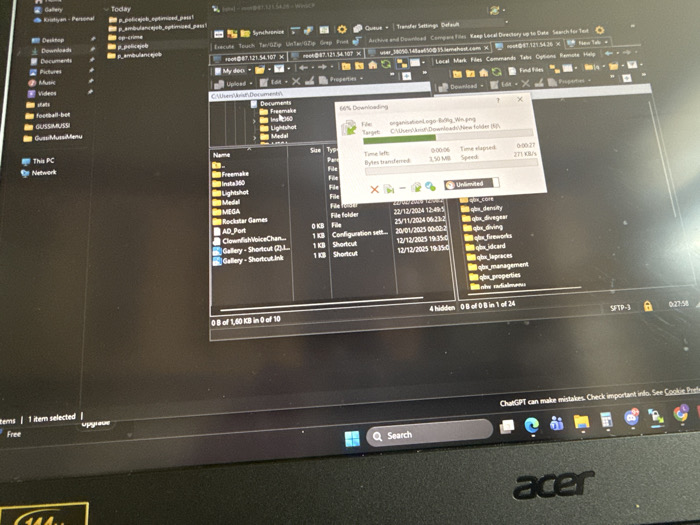
The scene depicts a close-up, angled view of an active Acer laptop screen in an indoor setting within The Hague, Netherlands. The display shows the Windows 11 operating system, with a prominent file transfer client (likely an SFTP application) and an overlaid download progress window.

**On-screen content details:**
*   **File Transfer Client:** The primary application features two panes. The left pane shows local directories, specifically "C:\Users\Krist\Documents\," listing folders such as "Freemake," "Insta360," "Lightshot," "Medal," "MEGA," "Rockstar Games," and various shortcuts. The right pane displays a remote server directory accessible via SFTP, identified by "root@87.121.54.107" and "user_380b.14fa@60.5.lemesthost.com." This pane contains multiple folders prefixed with "qbx_" (e.g., "qbx_core," "qbx_density," "qbx_divegear," "qbx_diving," "qbx_fireworks," "qbx_idcard," "qbx_laplaces," "qbx_management," "qbx_properties," "qbx_radialmenu").
*   **Download Progress:** A window titled "Downloading" is superimposed on the file transfer client. It indicates the file "organisationlogo_BoRg_Win.png" is being downloaded to "C:\Users\Krist\Downloads\New folder (6)." The download is 66% complete, with 3.50 MB transferred at a speed of 271 KB/s, and an estimated 6 seconds remaining.
*   **Windows 11 Interface:** The bottom of the screen displays the Windows 11 taskbar, featuring a central search bar and icons for various applications including Microsoft Edge, File Explorer, Mail, Calendar, and Photos. A banner stating "ChatGPT can make mistakes. Check important info. See Cookie Preferences" is visible above the taskbar.

**Physical observations:**
*   **Laptop:** The device is a black Acer laptop, with its logo visible on the bottom bezel.
*   **Screen Condition:** The screen surface appears to have minor dust accumulation and several faint scratches.
*   **People/Actions:** No individuals are present in the image. The active software processes indicate ongoing user interaction with the laptop, specifically a file download operation.
*   **Environment:** The immediate environment around the laptop is not discernible from the image, but the indoor setting is implied by the nature of the device and screen reflections.
COLLECT MEMORYS NOT PHOTOS 🎶

Mar 22, 2026

The Hague, Netherlands

Stake attention in this memory

Frustration
Complexity
Boredom
Technical
Annoyance

The scene depicts a close-up, angled view of an active Acer laptop screen in an indoor setting within The Hague, Netherlands. The display shows the Windows 11 operating system, with a prominent file transfer client (likely an SFTP application) and an overlaid download progress window. **On-screen content details:** * **File Transfer Client:** The primary application features two panes. The left pane shows local directories, specifically "C:\Users\Krist\Documents\," listing folders such as "Freemake," "Insta360," "Lightshot," "Medal," "MEGA," "Rockstar Games," and various shortcuts. The right pane displays a remote server directory accessible via SFTP, identified by "root@87.121.54.107" and "user_380b.14fa@60.5.lemesthost.com." This pane contains multiple folders prefixed with "qbx_" (e.g., "qbx_core," "qbx_density," "qbx_divegear," "qbx_diving," "qbx_fireworks," "qbx_idcard," "qbx_laplaces," "qbx_management," "qbx_properties," "qbx_radialmenu"). * **Download Progress:** A window titled "Downloading" is superimposed on the file transfer client. It indicates the file "organisationlogo_BoRg_Win.png" is being downloaded to "C:\Users\Krist\Downloads\New folder (6)." The download is 66% complete, with 3.50 MB transferred at a speed of 271 KB/s, and an estimated 6 seconds remaining. * **Windows 11 Interface:** The bottom of the screen displays the Windows 11 taskbar, featuring a central search bar and icons for various applications including Microsoft Edge, File Explorer, Mail, Calendar, and Photos. A banner stating "ChatGPT can make mistakes. Check important info. See Cookie Preferences" is visible above the taskbar. **Physical observations:** * **Laptop:** The device is a black Acer laptop, with its logo visible on the bottom bezel. * **Screen Condition:** The screen surface appears to have minor dust accumulation and several faint scratches. * **People/Actions:** No individuals are present in the image. The active software processes indicate ongoing user interaction with the laptop, specifically a file download operation. * **Environment:** The immediate environment around the laptop is not discernible from the image, but the indoor setting is implied by the nature of the device and screen reflections.

transactions
revenues
stakers
Earliest
Latest
Highest stake

No transactions found

More from this user

More from The Hague

COLLECT MEMORYS NOT PHOTOS 🎶

Mar 22, 2026

The Hague, Netherlands

Licensed under Creative Commons Attribution 4.0 International License. You are free to share and adapt this content with proper attribution.