
Stake attention in this memory
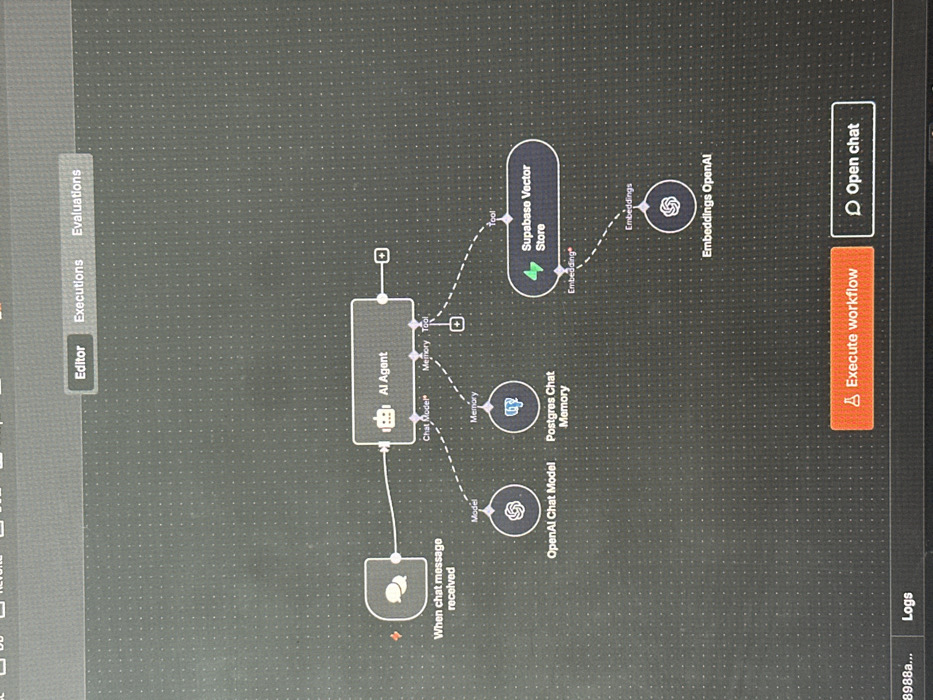
The scene depicts a digital screen, likely a computer monitor, photographed at a slight angle, with reflections and glare visible on its surface. This display is located in the city of Thiais, France. The screen presents a dark grey graphical user interface (GUI) featuring a faint grid pattern of white dots. At the top of the interface, several tabs are visible, with "Editor" highlighted in light grey, alongside "Executions" and "Evaluations." The central portion of the screen displays a workflow or agent design diagram composed of interconnected nodes. From left to right: - A rounded rectangular node labeled "When chat message received," containing a chat bubble icon and a red exclamation mark, represents an input trigger. - A solid line connects this input to a central rectangular node labeled "AI Agent," which features a robot icon. This "AI Agent" node has multiple outgoing connections. - Below the "AI Agent," three components are connected by dashed lines: - A circular node labeled "OpenAI Chat Model," depicting the OpenAI logo, connected via a line labeled "Model." - A circular node labeled "Postgres Chat Memory," featuring an elephant-like database icon, connected via a line labeled "Memory." - A rounded rectangular node labeled "Supabase Vector Store," displaying a green lightning bolt icon, connected via a line labeled "Tool." - Below the "Supabase Vector Store," a circular node labeled "Embeddings OpenAI," also bearing the OpenAI logo, is connected by a dashed line labeled "Embeddings." At the bottom of the screen, a section labeled "Logs" is visible, with a partial alphanumeric string "8988a..." to its left. To the right, two interactive buttons are present: an orange button with a warning icon labeled "Execute workflow," and a white button with a chat bubble icon labeled "Open chat." No individuals are present in the image.
Loading AttnAds…
No transactions found