Sign in
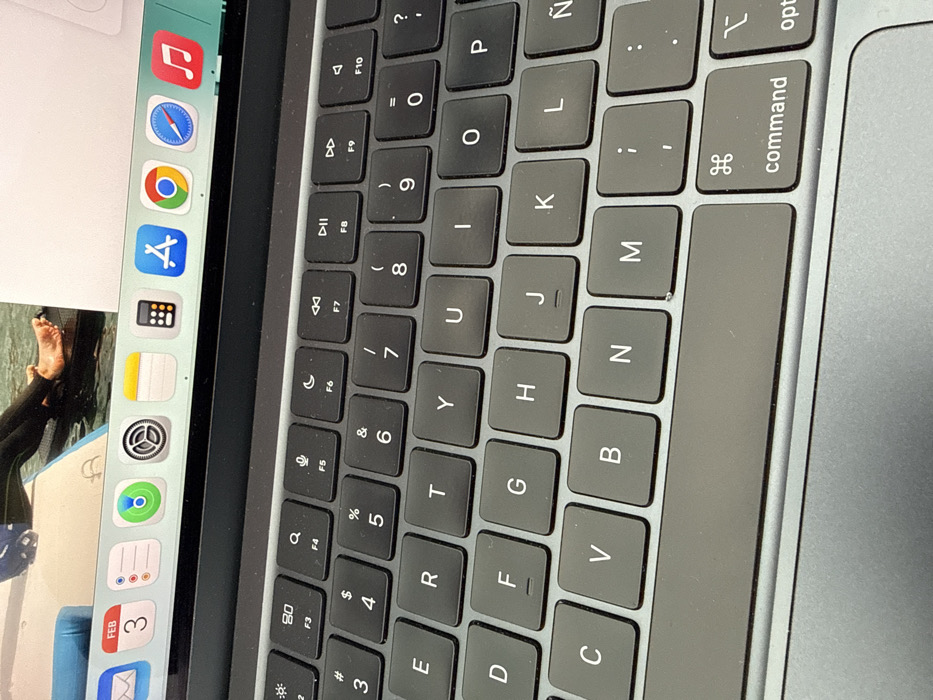
The image displays a close-up, rotated view of an open laptop, likely a MacBook due to its design, keyboard layout, and macOS dock. The image is oriented vertically, with the left side of the laptop (where the screen and keyboard meet) appearing at the top of the frame.

The majority of the frame is occupied by the laptop's dark-grey keyboard and trackpad area. The keys are square, dark grey or black, with white lettering for characters and symbols. The keyboard features a QWERTY layout. Visible keys include the function key row (partially F1-F10), number row (1-0) with associated symbols (e.g., !, @, #, $, %, ^, &, *, (, )), and letter keys (Q, W, E, R, T, Y, U, I, O, P, A, S, D, F, G, H, J, K, L, Z, X, C, V, B, N, M). Special keys like "command" and "opt" (option) are visible on the bottom row. Some function keys also display icons for screen brightness, media playback controls (rewind, play/pause, fast forward), and volume control. A dark grey trackpad is visible on the right side of the keyboard.

To the left of the keyboard, the laptop's screen is partially visible. A macOS dock is prominently displayed along the left edge of the screen (which would be the bottom edge if the laptop were horizontal). The dock contains numerous application icons, including:
- Music (red note icon)
- Safari (blue compass icon)
- Google Chrome (red, yellow, green, blue circle icon)
- App Store (blue "A" icon)
- Calculator (black grid icon)
- Notes (yellow notepad icon)
- Settings (grey gear icon)
- Photos (multicolored flower icon)
- Calendar (blue and white icon with "FEB 3")
- Mail (blue and white envelope icon)

Adjacent to the dock, a portion of an image is displayed on the screen. This image shows bare feet, possibly belonging to a person, partially submerged in water or next to a body of water. The person appears to be wearing dark clothing or a wetsuit on their leg. The water is a light blue color.

The laptop's chassis surrounding the keyboard is a light grey or silver color. The overall lighting suggests an indoor setting.
valerio

Feb 3, 2026, 7:02 PM

San Bernardino Tlaxcalancingo, Mexico

Stake attention in this memory

keyboard
laptop
technology
macbook
keys

The image displays a close-up, rotated view of an open laptop, likely a MacBook due to its design, keyboard layout, and macOS dock. The image is oriented vertically, with the left side of the laptop (where the screen and keyboard meet) appearing at the top of the frame. The majority of the frame is occupied by the laptop's dark-grey keyboard and trackpad area. The keys are square, dark grey or black, with white lettering for characters and symbols. The keyboard features a QWERTY layout. Visible keys include the function key row (partially F1-F10), number row (1-0) with associated symbols (e.g., !, @, #, $, %, ^, &, *, (, )), and letter keys (Q, W, E, R, T, Y, U, I, O, P, A, S, D, F, G, H, J, K, L, Z, X, C, V, B, N, M). Special keys like "command" and "opt" (option) are visible on the bottom row. Some function keys also display icons for screen brightness, media playback controls (rewind, play/pause, fast forward), and volume control. A dark grey trackpad is visible on the right side of the keyboard. To the left of the keyboard, the laptop's screen is partially visible. A macOS dock is prominently displayed along the left edge of the screen (which would be the bottom edge if the laptop were horizontal). The dock contains numerous application icons, including: - Music (red note icon) - Safari (blue compass icon) - Google Chrome (red, yellow, green, blue circle icon) - App Store (blue "A" icon) - Calculator (black grid icon) - Notes (yellow notepad icon) - Settings (grey gear icon) - Photos (multicolored flower icon) - Calendar (blue and white icon with "FEB 3") - Mail (blue and white envelope icon) Adjacent to the dock, a portion of an image is displayed on the screen. This image shows bare feet, possibly belonging to a person, partially submerged in water or next to a body of water. The person appears to be wearing dark clothing or a wetsuit on their leg. The water is a light blue color. The laptop's chassis surrounding the keyboard is a light grey or silver color. The overall lighting suggests an indoor setting.

Loading AttnAds…

transactions
revenues
stakers
Earliest
Latest
Highest stake

No transactions found

More from this user

More from San Bernardino Tlaxcalancingo

valerio

Feb 3, 2026, 7:02 PM

San Bernardino Tlaxcalancingo, Mexico

Licensed under Creative Commons Attribution 4.0 International License. You are free to share and adapt this content with proper attribution.