Sign in
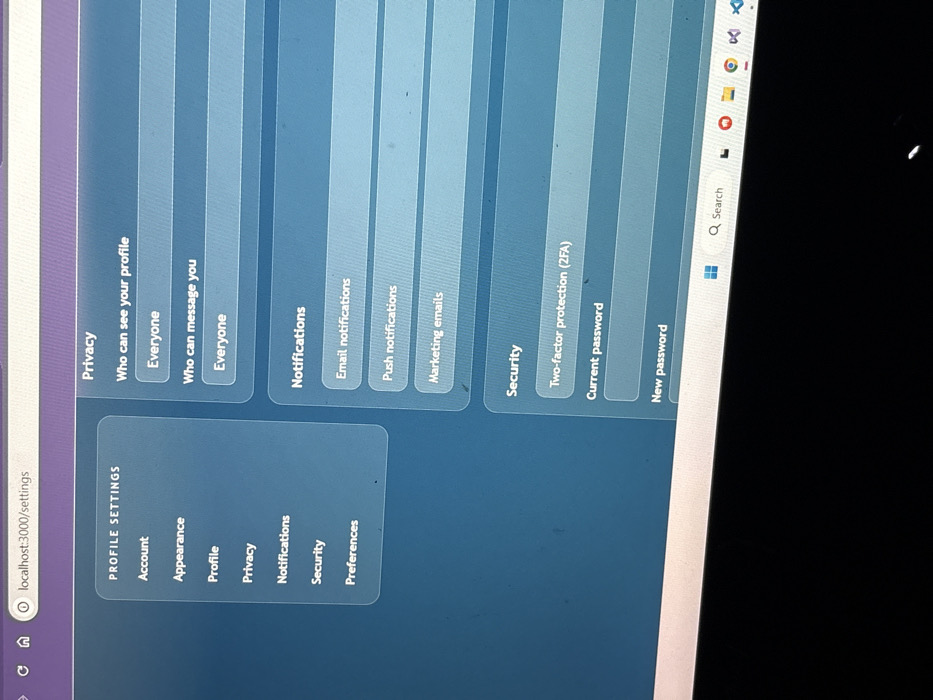
The image displays a computer monitor, likely a laptop screen, at an oblique angle, depicting a web application's "PROFILE SETTINGS" page. The scene is located in Stara Zagora, Bulgaria. The browser's address bar at the top of the screen shows `localhost:3000/settings`. The user interface of the web application features a dark blue and gray color scheme.

On the left side, a navigation panel titled "PROFILE SETTINGS" lists options: "Account," "Appearance," "Profile," "Privacy," "Notifications," "Security," and "Preferences." "Privacy" appears to be the currently selected item, indicated by its text color or background.

The main content area on the right is divided into three sections:
1.  **Privacy:** Contains two settings: "Who can see your profile," set to "Everyone," and "Who can message you," also set to "Everyone."
2.  **Notifications:** Lists "Email notifications," "Push notifications," and "Marketing emails."
3.  **Security:** Includes "Two-factor protection (2FA)," a field for "Current password," and a field for "New password."

The bottom portion of the screen reveals elements of a Windows operating system taskbar, showing the Windows logo, a search icon, and multiple application icons, including a web browser and a code editor. No individuals are visible in the image. The ambient lighting suggests a dark indoor environment, and minor dust or imperfections are visible on the screen surface.
Alex

Mar 5, 2026, 7:56 PM

Stara Zagora, Bulgaria

Stake attention in this memory

Control
Privacy
Security
Anxiety
Configuration

The image displays a computer monitor, likely a laptop screen, at an oblique angle, depicting a web application's "PROFILE SETTINGS" page. The scene is located in Stara Zagora, Bulgaria. The browser's address bar at the top of the screen shows `localhost:3000/settings`. The user interface of the web application features a dark blue and gray color scheme. On the left side, a navigation panel titled "PROFILE SETTINGS" lists options: "Account," "Appearance," "Profile," "Privacy," "Notifications," "Security," and "Preferences." "Privacy" appears to be the currently selected item, indicated by its text color or background. The main content area on the right is divided into three sections: 1. **Privacy:** Contains two settings: "Who can see your profile," set to "Everyone," and "Who can message you," also set to "Everyone." 2. **Notifications:** Lists "Email notifications," "Push notifications," and "Marketing emails." 3. **Security:** Includes "Two-factor protection (2FA)," a field for "Current password," and a field for "New password." The bottom portion of the screen reveals elements of a Windows operating system taskbar, showing the Windows logo, a search icon, and multiple application icons, including a web browser and a code editor. No individuals are visible in the image. The ambient lighting suggests a dark indoor environment, and minor dust or imperfections are visible on the screen surface.

Loading AttnAds…

transactions
revenues
stakers
Earliest
Latest
Highest stake

No transactions found

More from this user

More from Stara Zagora

Alex

Mar 5, 2026, 7:56 PM

Stara Zagora, Bulgaria

Licensed under Creative Commons Attribution 4.0 International License. You are free to share and adapt this content with proper attribution.